


12-21-2011, 08:29 PM
Assignment No. 03
Semester Fall 2011
Introduction to Computing-CS101
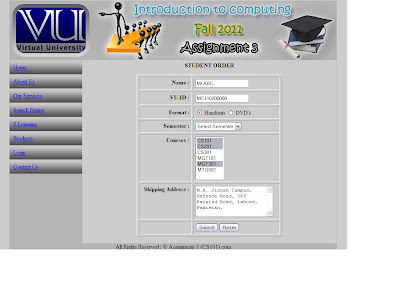
Design an HTML page using HTML elements such as tables, images, textboxes, text areas, radio buttons, list boxes, select boxes, background images, image maps, submit button and reset button. (Marks 25)
Read the following instructions carefully.
Your assignment must be a single HTML format file; any other format or screen shots are not acceptable.
Use of Style Sheet is not allowed in this assignment.
To create HTML file:
Open notepad, write your code in this new file and “save as”.
When it asks for file name, give its name like “studentID.html”.
Take care of double quotes, there must be starting and ending double quotes to save file in HTML format.


Semester Fall 2011
Introduction to Computing-CS101
Design an HTML page using HTML elements such as tables, images, textboxes, text areas, radio buttons, list boxes, select boxes, background images, image maps, submit button and reset button. (Marks 25)
Read the following instructions carefully.
Your assignment must be a single HTML format file; any other format or screen shots are not acceptable.
Use of Style Sheet is not allowed in this assignment.
To create HTML file:
Open notepad, write your code in this new file and “save as”.
When it asks for file name, give its name like “studentID.html”.
Take care of double quotes, there must be starting and ending double quotes to save file in HTML format.
0300-9520262
Get solution in 24 hour |cpmputer & internet
 mileys81:[SIZE="4"][SIZE="3"]....[/SIZE][/SIZE]